Unify365 is live — sign in with your Microsoft 365 admin account
$ the ai operations layer for m365
Your Microsoft 365 tenant, managed in plain English.
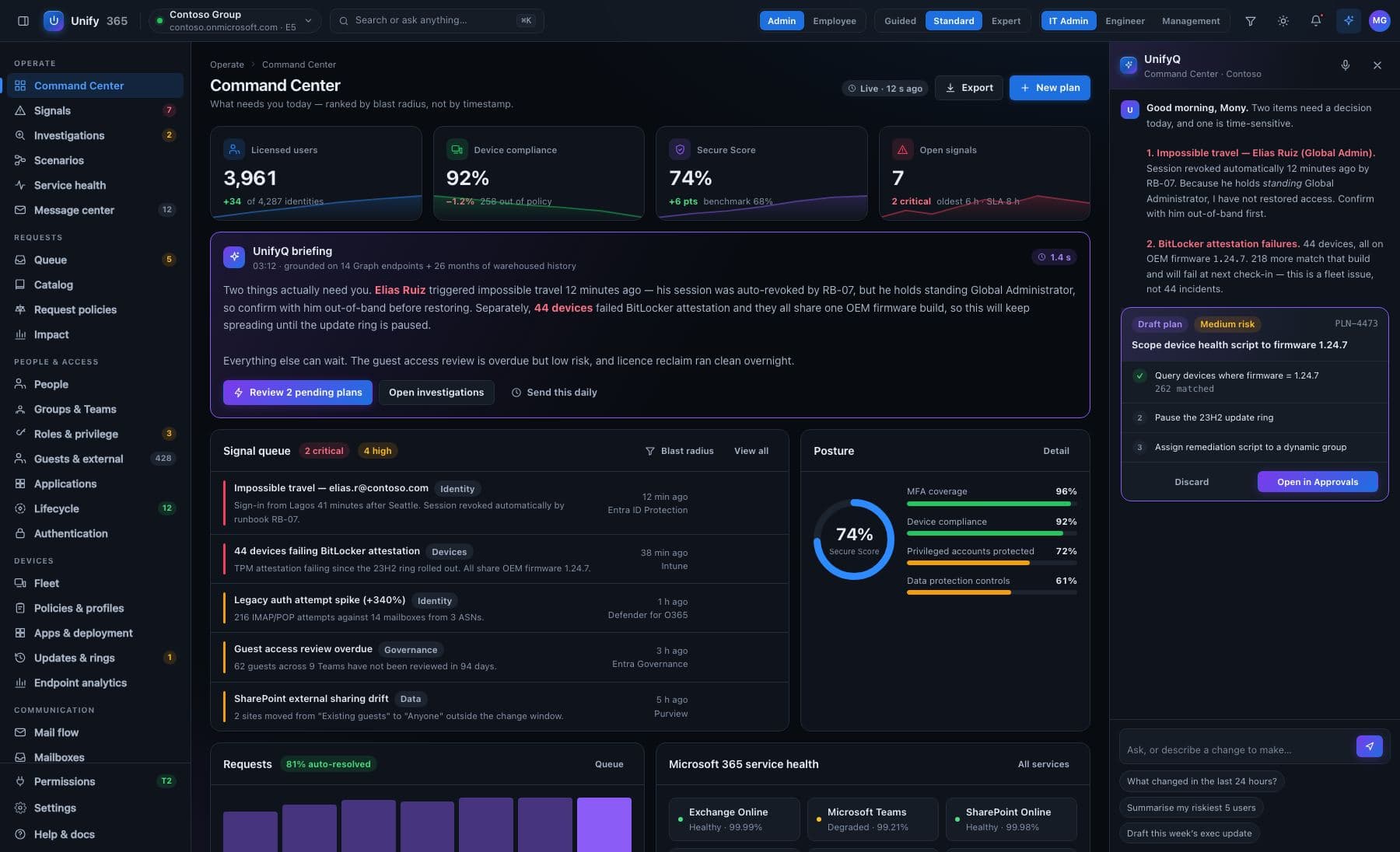
Fourteen admin portals collapsed into one console. Ask questions about users, licenses, devices, mail, and security posture — get instant answers from live data, audit-ready reports, and safe one-touch automation. Every change previewed. Every action logged.
Get started read-only scopes at install · nothing happens without a human saying yes
unify365 — assistant · contoso.onmicrosoft.com
you@contoso › which users still hold an E5 and haven't signed in for 60 days?
✓ queried Entra ID sign-in logs + license assignments · 847 users scanned · live data
user
last sign-in
license
l.moreno
94 days
E5
j.okafor
71 days
E5
svc-legacy01
312 days
E5
3 users · est. waste $1,373/yr — draft a reclaim plan? [y/N]
ENTRA ID·EXCHANGE ONLINE·SHAREPOINT·ONEDRIVE·TEAMS·INTUNE·DEFENDER·PURVIEW·POWER PLATFORM·VIVA·SERVICE HEALTH·LICENSING & BILLING
01 — THE UNIFIED DASHBOARD
One console for the whole estate.
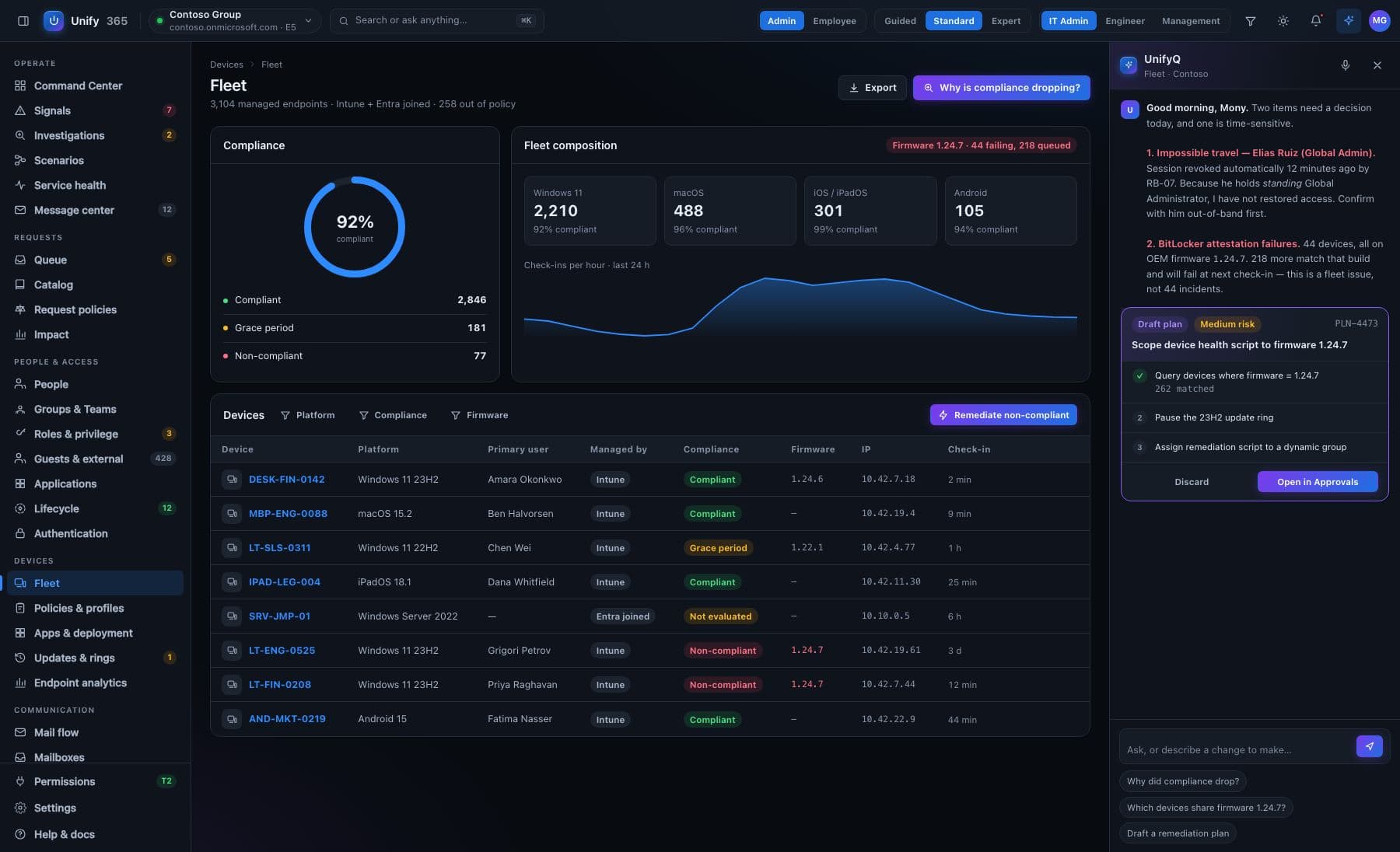
A single admin consent connects the tenant. Live posture cards refresh through Microsoft Graph change notifications — the dashboard is never yesterday's data. Every number drills down to the underlying records: filterable, sortable, exportable.
Unify365 contoso.onmicrosoft.com ▾ ⌕ Ask anything about your tenant… LIVE
OverviewUsers & GroupsLicensesDevicesMail FlowSecurityComplianceReportsAudit Log SAVED QUERIES Stale E5 holdersExternal fwd rulesGuests > 90d idle
LICENSES
912
31 unassigned · $2,140/mo
DEVICES
1,204
12 non-compliant
SIGN-IN RISK (24H)
3
1 open · 2 dismissed
MAIL FLOW
OK
2 external fwd rules
STORAGE
71%
6.2 TB of 8.7 TB
DEFENDER ALERTS
5
1 high · 4 informational
SERVICE HEALTH
9/9
all services healthy
HIGHNew Global Admin — r.diaz@contoso.com2h
MEDExternal sharing enabled — /sites/finance1d
HIGHLegacy auth re-enabled — CA policy “Baseline”3d
Secure Score trend71% ▲4
JANJUL
ASSISTANT
clean up stale guest accounts
Found 14 guests with no sign-in for 90+ days across 6 Teams. Drafted a removal plan — review the diff before anything runs.
Review planDismiss
⚠ Sign-in for k.tanaka flagged: impossible travel (Osaka → Lagos, 40 min). Recommend session revocation.
Explain why →Ask or act…
Drill-down everywhere. Every number opens the records behind it. Role-based views. Helpdesk, security, finance — each sees only their slice. Custom dashboards. Any saved query becomes a card.
02 — FULL SERVICE COVERAGE
It speaks fluent Microsoft 365 — every service, in depth.
Not a wrapper around one API. Unify365 surfaces the details the admin centers hide behind tabs — forwarding rules, CA policy internals, compliance check-ins, sharing links, retention holds.
Entra ID
users · groups · roles · CA · sign-in logs
CA: Require MFA — all usersON
CA: Block legacy authREPORT-ONLY
Privileged roles4 GLOBAL ADMINS
Exchange Online
mailboxes · forwarding · mail flow
j.kim → gmail.comEXT FWD
sales@ → partner.ioEXT FWD
Shared mailboxes23
SharePoint & OneDrive
sites · storage · external sharing
/sites/finance88%
/sites/engineering54%
Anonymous links17 ACTIVE
Teams
teams · guests · policies
Active teams64
Guest accounts112 · 14 STALE
Ownerless teams3
Intune
devices · compliance · configuration
Compliant1,192 / 1,204
Missed 3+ check-ins12
Pending OS updates87
Defender
alerts · Secure Score
Phishing campaign detectedHIGH
Malware quarantined4 · 7 DAYS
Secure Score71% ▲4
Purview
audit · retention
Retention policies8 ACTIVE
Unified audit logENABLED
eDiscovery holds2
Licensing & Billing
SKUs · assignment · spend
E5 — 412 of 440 used94%
E3 — 397 of 400 used99%
Reclaimable spend$2,140/MO
03 — THE AI ASSISTANT
Multi-step operations, with a plan you approve first.
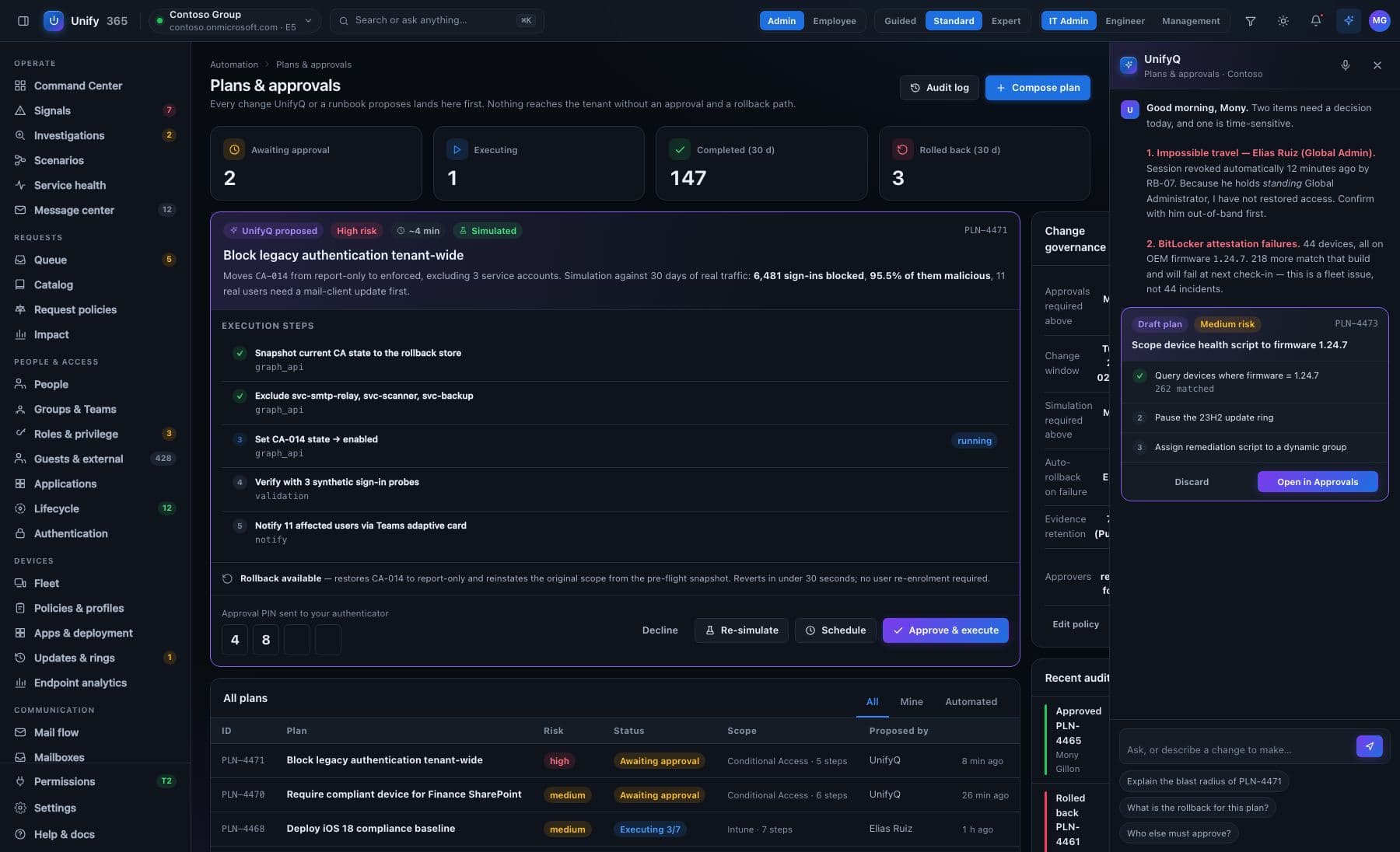
Tell it what you want done. It drafts the full plan — which objects, what criteria, what happens to each — and nothing runs until a human approves. Approved plans execute step-by-step with a live log.
Answers from live data — never canned responses. Every answer cites what it queried.
Explanations, not just data — why a sign-in was risky, what a policy actually does, in plain English.
Tenant memory — it knows your naming conventions, baselines, and documented exceptions.
Reports on demand — “license waste report for the CFO” becomes a branded document in seconds.
Assistantevery step logged to the audit trail
Offboard Dana Whitfield — she left on Friday.
Found dana.whitfield@contoso.com (Marketing, E3, 2 devices, 14 group memberships). Here's the offboarding runbook — nothing runs until you approve:
1Disable account + revoke all sessions and tokens
2Convert mailbox to shared → manager: t.osei
3Set out-of-office auto-reply (template: departure)
4Transfer OneDrive ownership → t.osei (90-day window)
5Reclaim E3 license → return to pool
6Remove from 14 groups · retire 2 Intune devices
DRY-RUN PREVIEW — THE EXACT DIFF
− accountEnabled: true → false
− licenses: [E3] → []
− mailboxType: user → shared
…14 group removals, 2 device retirements
Type the user's name to arm this action:
dana.whitfield
Send for approvalmaker/checker: requires sign-off from an approver role
✓ APPROVED BY M.ALVAREZ · EXECUTING
✓ account disabled · 41 sessions revoked
✓ mailbox converted to shared
▸ transferring OneDrive ownership… (3 of 6)
audit #8412 · rollback available for 30 days
04 — WHO HAS ACCESS TO WHAT
Effective access, computed — not guessed.
Group nesting is fully expanded, so a grant hidden three groups deep is still a grant — and the path it arrives by is kept, not discarded.
Time travel — access is temporal. Ask what someone could reach as of any date; leavers keep their history.
360° drill-downs — users, devices, groups, licences and roles at admin-console depth, every field linking onward.
Delegated admin that fails closed — operator scopes are enforced inside the engine at propose, execute and rollback. A hard boundary, not a hidden menu.
Many tenants, one console — switching tenants grants entry only. It never widens a role or a scope.
Access graph how does j.okafor reach SharePoint admin?
j.okafor → member of Helpdesk-L2 → nested in IT-Ops → holds SharePoint Administrator
path preserved · 1 of 3 paths to this role · nesting depth 2
as-of 2026-03-14 › held 2 roles via 5 groups — snapshot reproducible
scope check › propose blocked — target outside operator scope · fails closed
tenant switch › entry granted · roles and scopes unchanged
05 — CONTINUOUS ENGINES
Drift, policies and licence waste — watched around the clock.
Three engines evaluate the tenant on a schedule and open findings you can act on. Where a check cannot run, it says so — nothing is ever quietly assumed clean.
Configuration drift
Baselines captured per surface. When reality diverges you get the exact delta — and a prepared reverse-plan that flows through the approval gate. Surfaces that are not watched say so, honestly.
CA policy “Baseline”DRIFTED · 2 FIELDS
Intune compliance policyMATCHES BASELINE
Transport rulesNOT WATCHED
reverse-plan drafted → review & approve
Policy findings
A curated policy library runs continuously — privileged-role sprawl, public groups, enabled-but-unlicensed accounts. A finding stays open until reality changes or an operator suppresses it with a written reason, kept in a visible exception register.
Single Global AdminRESOLVED BY SCAN
Public group: All CompanyOPEN
Break-glass unlicensedSUPPRESSED · REASON KEPT
a check that cannot run shows “not evaluable” — never clean
Licence optimisation
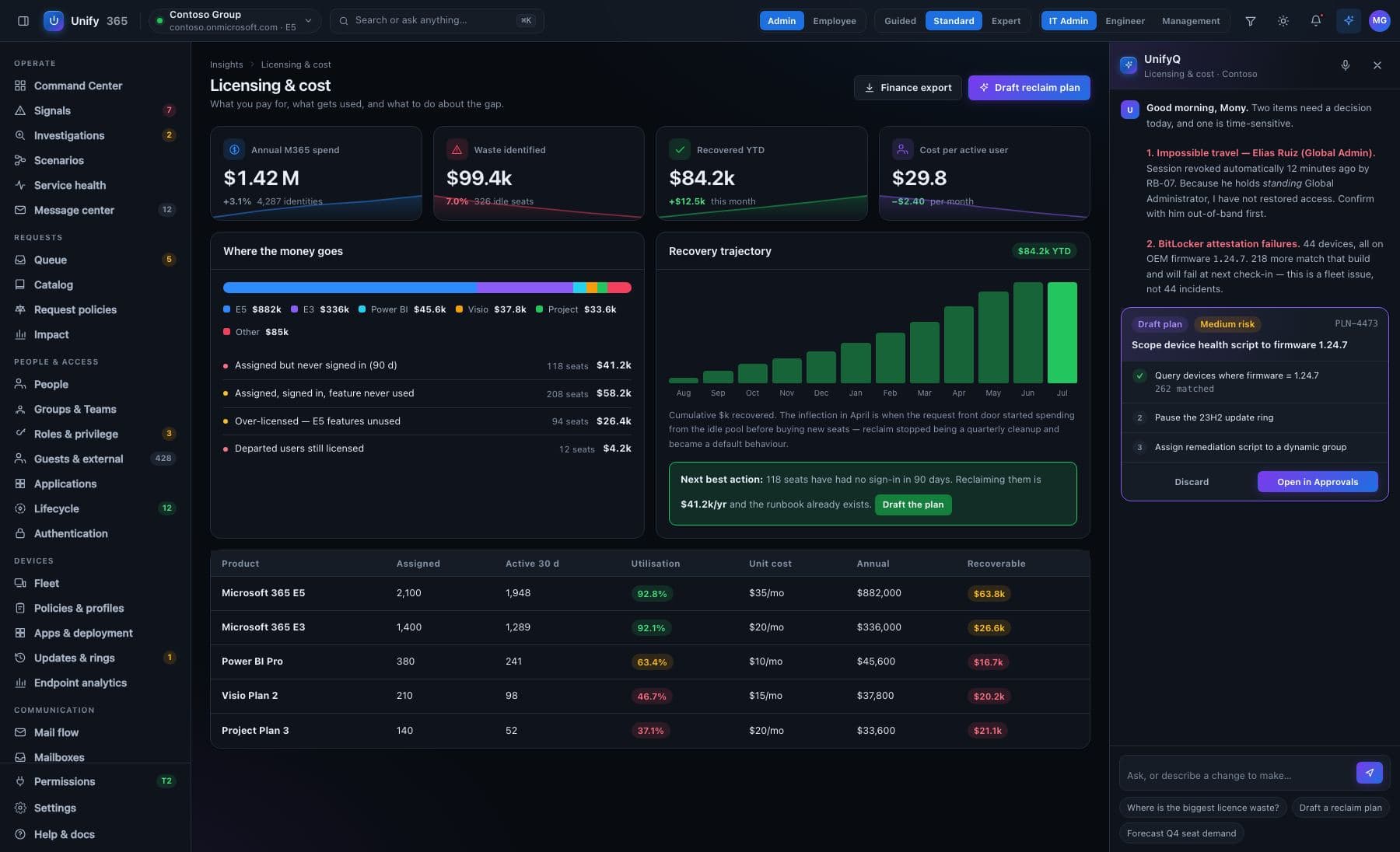
Overlap ladders find people paying twice for the same capability. Disabled accounts still holding seats surface immediately. Where usage cannot be proven, the answer is “unknown” — never “unused”.
E5 + overlapping add-on12 HOLDERS
Disabled, still licensed5 SEATS
No usage signalUNKNOWN — NOT “UNUSED”
reclaim plans flow through the same gate
06 — ONE-TOUCH COMPLIANCE
Governing-body compliance checks — and the fixes — in one click.
Assess the tenant against built-in baseline packs. Findings arrive in plain English, ranked by risk and effort — written so both the auditor and the CEO understand them. Every finding carries a prepared remediation that flows through the approval gate.
POSTURE
Compliance posture
Tracked as a trend, not a snapshot. Updates in real time as remediations land.
Microsoft Secure Score71% ▲4
CIS M365 Foundations Benchmark81 / 104 controls
NIST CSF-aligned baseline68%
HIPAA pack3 gaps
SOC 2 pack92%
CMMC-aligned controlsL1 met · L2 74%
GDPR pack2 gaps
Run assessment — all packslast run 22 min ago · scheduled weekly
Findings — ranked by risk × effort23 open · 81 passing
Legacy authentication is not blockedHIGH RISKLOW EFFORT
Why it matters: legacy protocols (IMAP, POP, SMTP AUTH) skip MFA entirely — most password-spray attacks come in this door. CIS 1.1.9 · NIST PR.AC-7 · Secure Score +8.
// prepared remediation — dry-run
+ CA policy “Block legacy auth” → enabled
affects 7 sign-ins/wk · 2 service accounts need app passwords first
Review fix → approveDocument exceptionflows through the five-stage gate ↓
17 anonymous sharing links older than 90 daysMEDreview fix → Mailbox auditing disabled on 3 shared mailboxesLOWreview fix → ✓ drift watch armed — alerts the moment reality diverges from baseline↓ export auditor evidence pack (time-stamped, control-mapped)
Suggested remediations — per frameworkranked by score gained ÷ effort · each fix is a gated action
Pick a framework and the assistant suggests the shortest path to closing its gaps — what to change, what it affects, and what the score becomes. Every suggestion carries a prepared fix: one click sends it through the five-stage gate, so "one-click" still means previewed, approved, audited and reversible.
CIS M365 Foundations81 → 89 / 104
3 suggested fixes: block legacy auth, enable mailbox auditing, expire anonymous links > 90d. Combined effort: low — no user-visible impact expected.
Fix all 3 → one approvaldry-run first · rollback 30d
HIPAA pack3 gaps → 1
2 gaps have prepared fixes (retention on shared mailboxes, audit log coverage). The third needs a business decision — flagged for you, never auto-fixed.
Review 2 fixes1 needs a human decision
GDPR pack2 gaps → 0
2 suggested fixes: retention policy on personal-data sites, guest access review for externally shared PII locations. Evidence pack export maps each control for your DPO.
Review 2 fixescontrol-mapped evidence export
Secure Score71% → est. 79%
Top suggestion: block legacy auth (+8). Simulated against your last 30 days of sign-ins first — 2 service accounts need app passwords before it's safe.
Simulate, then fixwhat-if on real sign-ins
07 — AUTOMATION WITH A HUMAN IN THE MIDDLE
Unify365 never changes your tenant silently.
Every write action — from a license swap to a device wipe — passes through the same five-stage gate, each gated proportionally to its blast radius.
STAGE 1
Dry-run preview
The exact diff: which objects change, from what, to what.
STAGE 2
Typed confirmation
Type the target's name to arm the action. No accidental clicks.
STAGE 3
Maker / checker
Helpdesk proposes; an admin approves. Configurable per action type and role.
STAGE 4
Immutable audit
Who, what, when, before/after values — tamper-evident, exportable.
STAGE 5
Rollback
Where the platform allows it, one click restores the previous state.
action catalog: licenses · groups & roles · password resets · enable/disable · session revocation · mailbox conversion · device sync/retire/wipe · conditional access
08 — AUTOMATION WITH A DIAL
Workflows run from notify-only to hands-free — you set the dial.
Trigger → conditions → actions, no code, with joiner / mover / leaver templates built in. Every action a workflow takes is the same gated action a human would submit — dry-run, audit and rollback included.
The dial is enforced server-side — Notify · Approve · Two approvers · Auto, per workflow. Arming a hands-free workflow is itself a typed, audited decision.
Runs act as their author — a workflow can never reach further than the person who armed it.
Sweeps are capped and reported — a bulk run tells you what it touched and what it deliberately left alone.
Workflow — Leaver offboardingarmed by m.alvarez · runs as m.alvarez
WHENuser is marked as leaver
IFaccount enabled · licence held
THENdisable account → convert mailbox to shared → reclaim licence
3 gated actions · each with its own dry-run, audit entry and rollback window
AUTONOMY DIAL — server-enforced
NOTIFY APPROVE TWO APPROVERS AUTO
✓ LAST RUN — COMPLETED
1 leaver processed · 3 actions executed after two approvals · 0 skipped · full audit trail
09 — ALWAYS WATCHING
Alerts with an explanation, not just a red dot.
AI-contextualized alerting
Pushed to Teams, email, or webhook with a plain-English explanation and a recommended response.
⚠ IMPOSSIBLE TRAVEL — K.TANAKA
Sign-in from Osaka, then Lagos 40 minutes later. MFA passed both times — token theft is likely. Recommended: revoke sessions, require re-registration.
Anomaly baselines
Unify365 learns the tenant's normal — sign-in geography, license churn, sharing volume — and flags deviations. Fewer static thresholds, fewer false alarms.
sharing volume — baseline 40/day
today: 312 shares — 7.8σ above baseline
What-if simulation
Test a Conditional Access policy against the last 30 days of real sign-ins before enabling it. No more Friday-night lockouts.
simulate: “block non-compliant devices”
✓ 11,204 sign-ins unaffected
⚠ would have blocked 3 execs traveling in Mexico
→ suggest: add trusted-location exception
10 — SECURITY & ARCHITECTURE
Built for the security review, not around it.
Trust through restraint: the product's most important feature is what it refuses to do without you.
// consent model
granted: read-only Graph scopes
not granted: write scopes — separate, explicit consent event, only if you enable automation
Least-privilege by default
Read-only scopes at install. Write scopes are a separate consent you grant only when you enable automation.
Human-approved writes
No autonomous changes, ever. The five-stage gate applies to every write, including the ones the AI proposes.
Hard tenant isolation
Tenant identity derives from the authenticated session, never from a request. Cross-tenant leak tests run on every build.
Encryption everywhere
TLS in transit, encryption at rest, secrets in managed vaults — no static credentials in application code.
Complete auditability
Every read and write attributable to a person, a time, and a reason. Exportable. Streamable to Sentinel or Splunk.
Open surface
Everything in the UI exists in the API. Webhooks for events, PowerShell-friendly endpoints for the diehards.
11 — REPORTS ON DEMAND
You don't need 500 canned reports.
Just ask UnifyQ what you need, what format you want it in, and who you want it sent to. Done. Delivered. Every report is built from live data, branded, and exportable — PDF, CSV or Excel — and any report can become a schedule: the Monday "what changed" digest, licence waste for finance, device compliance for the auditor.
Ask, don't browse — describe the report in a sentence. No report catalog to learn, no query builder to fight.
Any format, any audience — branded PDF for the CFO, CSV for the analyst, Excel for the auditor. Executive scorecards included.
Delivered on a schedule — one sentence turns a report into a standing delivery to email or Teams.
Always from live data — every report cites what it queried and when. Never a stale export dressed as current.
you@contoso › licence waste report, branded PDF, send it to the CFO every Monday at 8am
✓ report built — 31 reclaimable seats · $2,140/mo · sources cited
✓ format: branded PDF · recipient: cfo@contoso.com
✓ schedule: Mondays 08:00 — first delivery drafted for your review
done. delivered — and logged, like everything else.
12 — THE EVERYTHING MAP
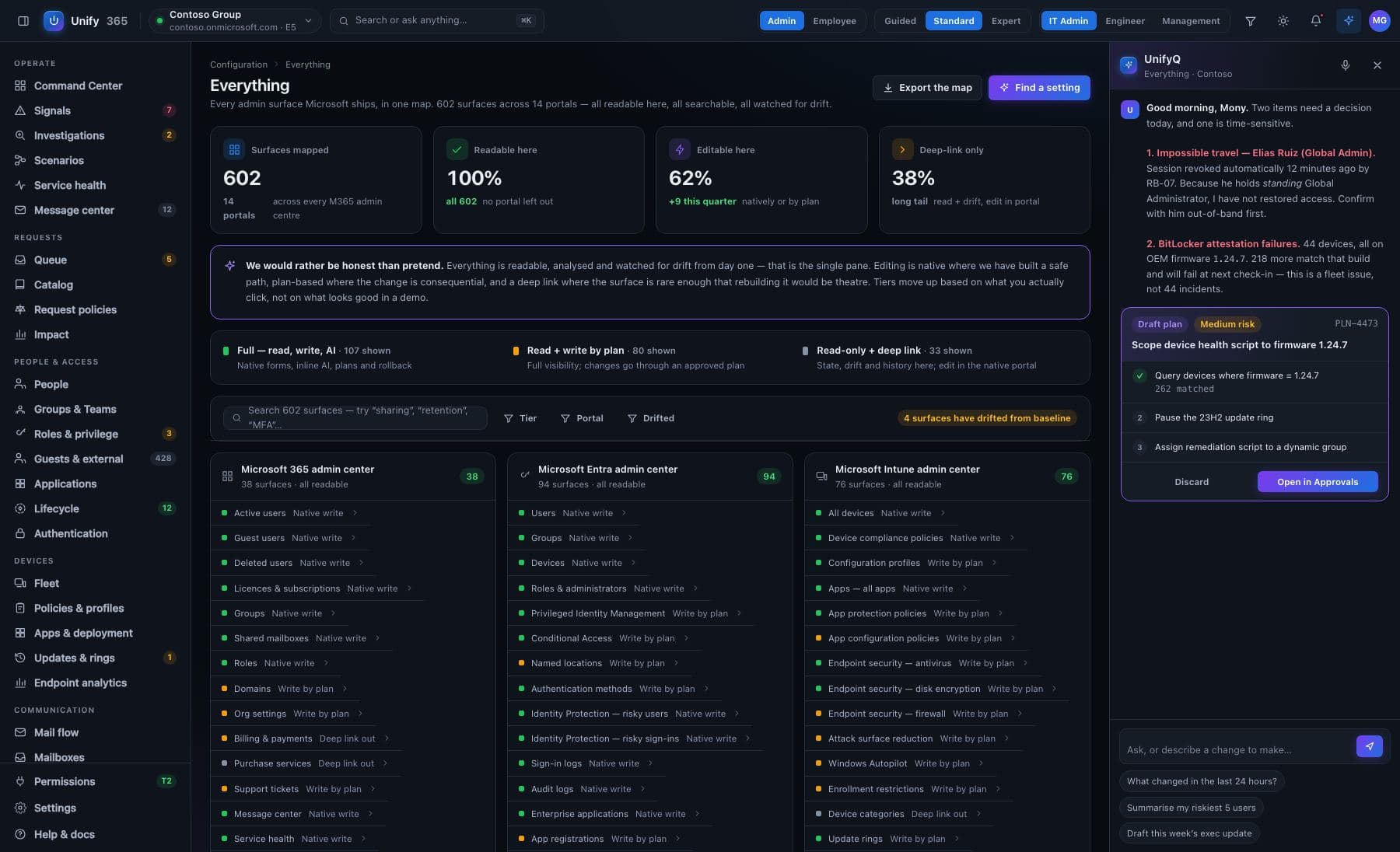
543 admin surfaces across 14 portals, mapped and tiered.
"Single pane" is usually a slogan. Ours is a coverage map: every Microsoft admin surface catalogued, and every route without a bespoke screen still renders through one generic surface renderer — so nothing falls off the edge of the console.
543
admin surfaces mapped and tiered across the Microsoft estate
14
separate Microsoft portals those surfaces are scattered across today
254
implemented in Unify365 today — the rest render through the generic surface renderer, and the map says which is which
1
consent to connect it all — and one search (⌘K) over every surface
honest coverage: every surface shows its tier and its state — bespoke screen · generic renderer · mapped, not yet reachable
13 — ONE RECORD, EVERY SOURCE
360° records with per-source freshness — never a stale answer dressed as live.
Person 360 and Device 360 pull every source into one record — Intune, Entra and Autopilot correlated per device, down to TPM, BIOS, Defender state and failing settings. Each facet carries its own as-of stamp, a partial sync never overwrites good data, and a permission gap is recorded as a gap — not silently dropped.
Correlated, not concatenated — three directories agree on one device record, with the disagreements shown instead of averaged away.
Freshness per source — every facet says when its data was captured. Stale is visible, never assumed current.
Tri-state reconcile — a partial sync updates what it saw and leaves the rest intact, marked with its older stamp.
Gaps stay gaps — a source we lack permission to read shows as "not readable — permission gap", never as a blank.
Device 360 — LAPTOP-8842 · s.ferreira1 device · 3 sources
INTUNEcompliant · BitLocker on · Defender healthyas-of 4 min ago
ENTRAjoined · owner s.ferreira · last sign-in 2has-of 9 min ago
AUTOPILOTregistered · group tag FIELD-SALESas-of 3 days ago
WARRANTYnot readable — permission gap, recorded as a gap—
tri-state reconcile: last partial run updated 2 of 3 sources · nothing overwritten
14 — BEYOND THE CLOUD
EARLY ACCESS — DESIGN PARTNERS WELCOME On-prem AD and hybrid identity — through the same gate.
Most mid-market identity still starts in on-prem Active Directory, and Graph only shows it read-only. Unify365's answer is an outbound-only agent on your own hardware: it dials out to a signed job queue — no inbound firewall rule, no VPN, no exposed port — and every job it runs passes the identical five-stage gate as a cloud change. Disabling an AD account looks exactly like disabling a cloud account: before/after diff, typed name, approval, audit, 30-day undo.
Outbound-only by design — the agent connects to us; we never connect in. Built to pass your security review, not to route around it.
One graph, badged by source — on-prem objects live in the same lists, 360s and access graph as cloud objects, marked onprem-ad · sccm · entra, never hidden in a separate section.
Hybrid identity as one person — the AD side and the Entra side of a user shown together, including where they disagree. Sync drift is surfaced, not averaged away.
Agentless snapshot import — a signed, encrypted inventory bundle (AD, parsed GPO, SCCM, network) gets you the access graph with no agent at all. Snapshot data carries its capture time everywhere it appears — it never masquerades as live.
Honest reach states — connected · degraded · offline since when · not installed. An action the agent can't reach says so before you type the confirmation, not after.
Gated action — on-prem ADagent: connected · corp.local
ONPREM-ADDisable account — CORP\d.whitfield
// dry-run — same diff, different reach
− Enabled: true → false
− memberOf: 9 groups → 0
runs locally via agent · structured result returned · no credentials leave the network
Type the account name to arm this action:
d.whitfield
✓ approved · executed by agent · audit entry written
rollback available for 30 days — same as cloud
SCCM snapshot import — captured 2026-08-01 14:02 · read-only
15 — BUILT FOR MSPs
Forty customer tenants. One console. One question.
Multitenant by architecture, not by afterthought. Tenant identity derives from the authenticated session — never from a request — and switching tenants grants entry only: it never widens a role or a scope. Delegated RBAC inside every tenant: admin, approver, helpdesk, read-only auditor.
Cross-tenant search — "which of my customers still allows legacy auth?" answered across the fleet in one query.
Triage-sorted fleet view — the tenants that need attention rise to the top; healthy ones stay quiet.
Anti-enumeration by design — operator access is email-keyed per tenant; there is no list to walk.
Scoped operators, enforced in the engine — a helpdesk operator's scope holds at propose, execute and rollback. Fails closed.
Fleet — triage orderquery: legacy auth allowed?
northwind.onmicrosoft.comLEGACY AUTH ALLOWED3 findings
fabrikam.onmicrosoft.comREPORT-ONLY1 finding
contoso.onmicrosoft.comBLOCKEDclean
tailspin.onmicrosoft.comBLOCKEDclean
per-tenant billing · white-label reports · GDAP-based delegation
16 — PERMISSION TIERS
Read everything. Write selectively. Grant it in steps.
Permissions come in five tiers, and every surface in the product says which tier it needs. Start at T0 — read-only — and let Unify365 report what it would have handled before you grant a single write scope. Dropping a tier disables its features; it never breaks the product.
T0
Read-only
The whole console, dashboards, reports and findings — with zero write risk to the tenant.
T1
Licences & groups
Licence assignment and group membership through the gate.
T2
Apps & devices
Device sync, retire and app actions join the catalog.
T3
Governance
Policy remediations, drift reverse-plans and compliance fixes.
T4
Privileged
The highest-radius actions — with the strongest warnings. Global Administrator changes stay hard-blocked, at every tier.
17 — PRICING
Start free. The licence report usually pays for the rest.
Entitlements are code: a blocked capability tells you exactly which plan unlocks it — no sales call required. Available direct and through the Microsoft commercial marketplace.
Free
$0
One tenant, up to 50 users. The full console, read-only or gated.
Team
$99/mo
SMB internal IT, one tenant.
BusinessPOPULAR
$299/mo
Mid-market: scheduled reports, custom dashboards, 1-year audit retention.
Enterprise
from $799/mo
SSO, 7-year retention, compliance packs, SIEM streaming, named CSM.
MSP
$79/tenant/mo
Per managed tenant, with bulk discounts at 10, 25 and 50 tenants.
Ask. Approve. Done.
Connect your tenant with a single admin consent — read-only until you decide otherwise.
Get started © 2026 Unify365 — the AI operations layer for Microsoft 365